The Stream Deck plugin is a preview feature added in LotAtc 2.7.0. It is part of LotAtc Advanced and lets you bind LotAtc settings, panels, and connection state to physical (or virtual) Stream Deck buttons and encoders.
Requirements
- A working Stream Deck setup: hardware, or the Stream Deck software in simulator mode.
- The Stream Deck application v6.5 or later.
- LotAtc Client 2.7.0 or later.
Installation
The plugin is auto-installed with LotAtc Client. It is also available as a .streamDeckPlugin file in your LotAtc install directory if you want to install it on another machine — double-click the file and the Stream Deck application will install it.
After install, restart the Stream Deck application. The LotAtc category appears in the actions list, with all available actions grouped under it.
How it works
LotAtc Client embeds a small WebSocket server (port 8282 by default). The plugin connects to it and forwards button presses, encoder rotations, and dial input. State changes flow back the same way, so button images update live to reflect the current LotAtc state.
If LotAtc Client is not running, the plugin shows a disconnected state. It reconnects automatically as soon as LotAtc starts.
Available actions
| Action | What it does |
|---|---|
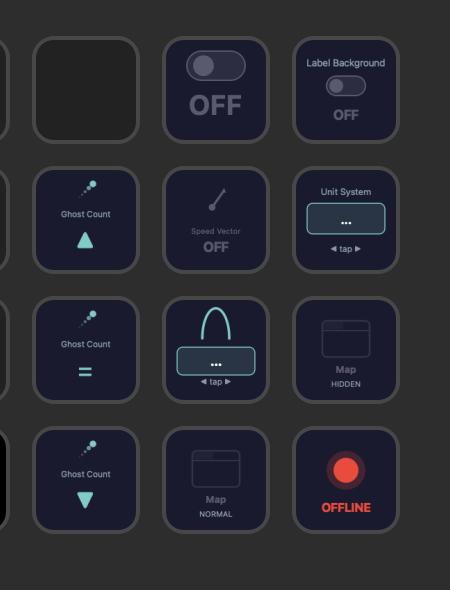
| Toggle Setting | Toggle a boolean LotAtc setting on/off (e.g. show/hide labels, units circles, …). |
| Cycle Setting | Cycle through the values of a setting (e.g. metric ↔ imperial). On encoder keys, rotate to step and push to confirm. |
| Adjust Setting | Increase or decrease a numeric setting. On encoder keys the dial steps the value; on standard keys two buttons act as +/-. |
| Dock Panel | Show, hide or minimize a dock panel. The single action covers all dock states (a previous version exposed two separate actions — they are now unified). |
| Connection | Visual indicator of the connection between the plugin and LotAtc Client (connected / disconnected). |
When you drop an action onto a key, the Property Inspector lets you pick the LotAtc setting or dock panel to bind. Settings are grouped by category (display, items, labels, …), and numeric settings expose their min/max/step so the plugin can build a sensible dial range.
Button images use the LotAtc UI accent color so the Stream Deck visuals match your LotAtc theme.
Troubleshooting
- Plugin shows “Disconnected” — confirm LotAtc Client is running, and that nothing else is using port 8282 on the same machine. The plugin auto-reconnects.
- Action does not appear — restart the Stream Deck application after a LotAtc update so the plugin manifest is reloaded.
- Plugin logs: on Windows,
%APPDATA%\Elgato\StreamDeck\logs\. - LotAtc bridge logs:
LotAtc Data/Logs/LotAtc_client.log.
This is a first release. More actions and settings coverage will follow.